🚚 Free Worldwide Shipping on All Orders!Shop Now

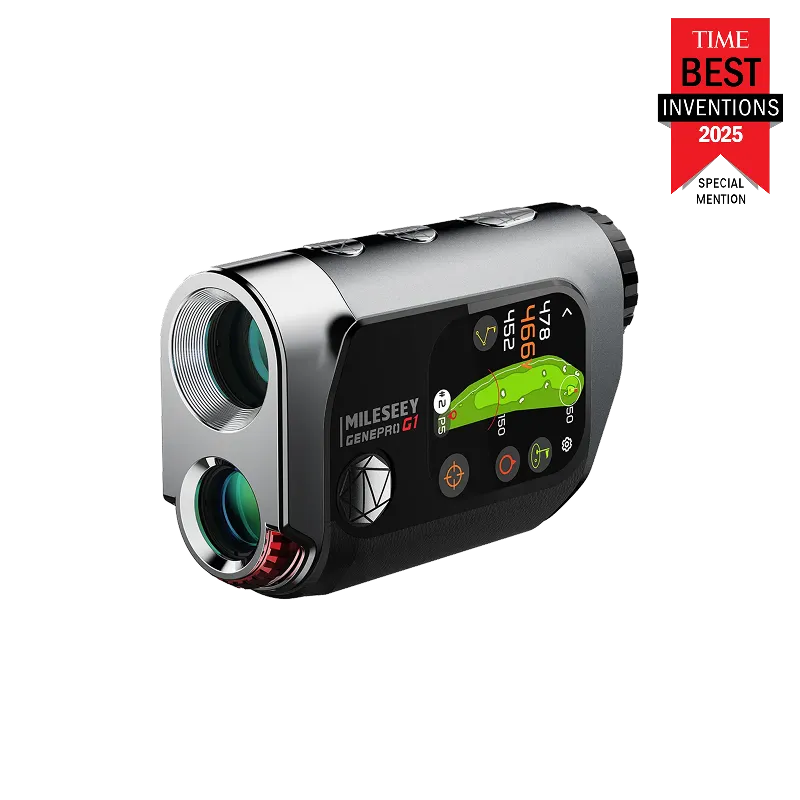
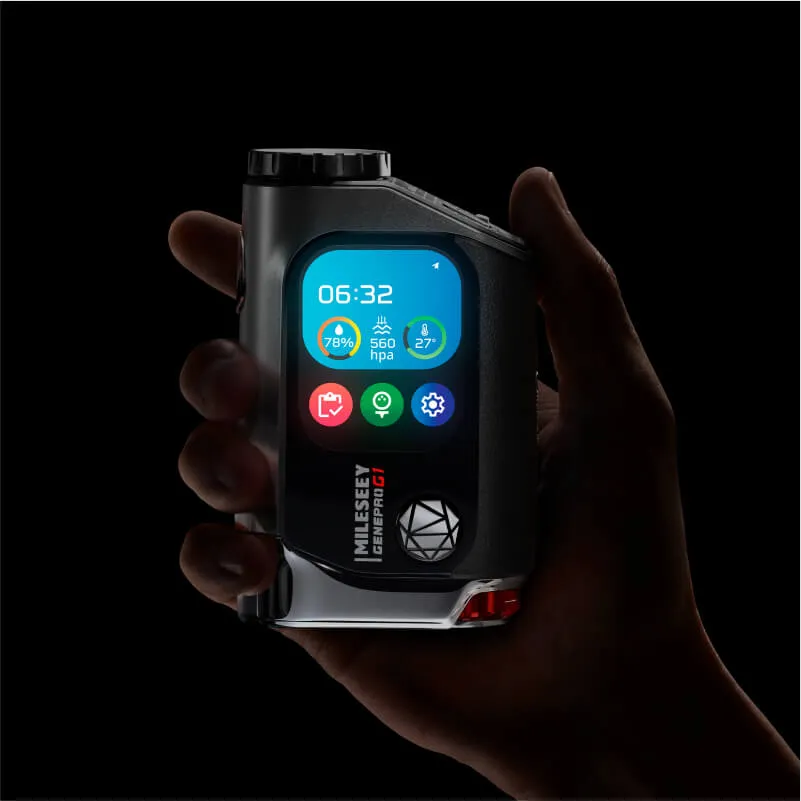
MILESEEY GenePro G1 Touchscreen & GPS Rangefinder
MILESEEY GenePro G1 Touchscreen & GPS Rangefinder
- Lifetime Access to 43,000+ Preloaded Courses without Subscription
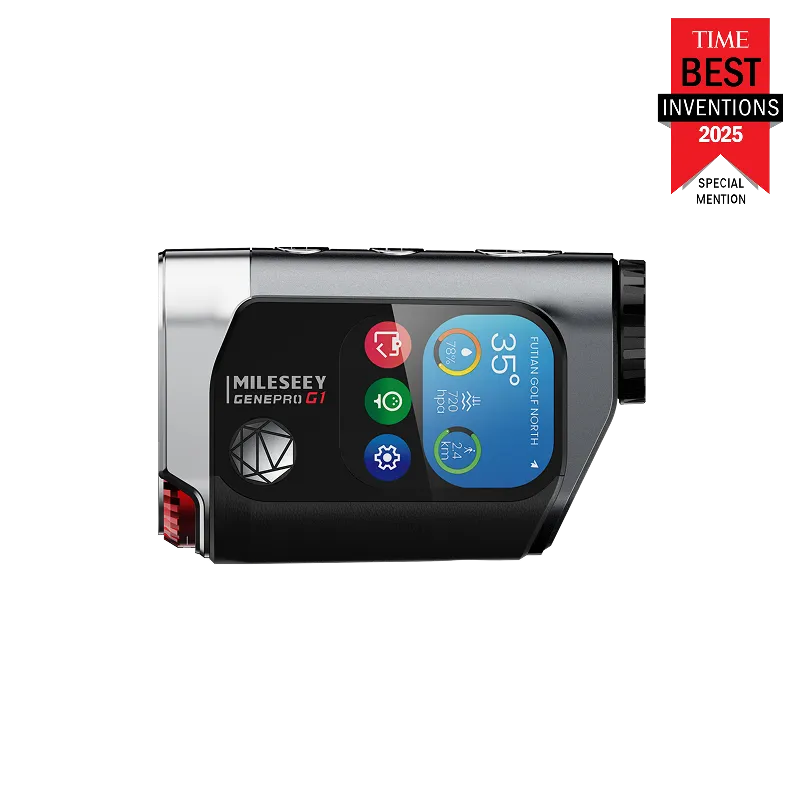
- Biggest 2.13” AMOLED Touchscreen – Ultra Bright in Sunlight
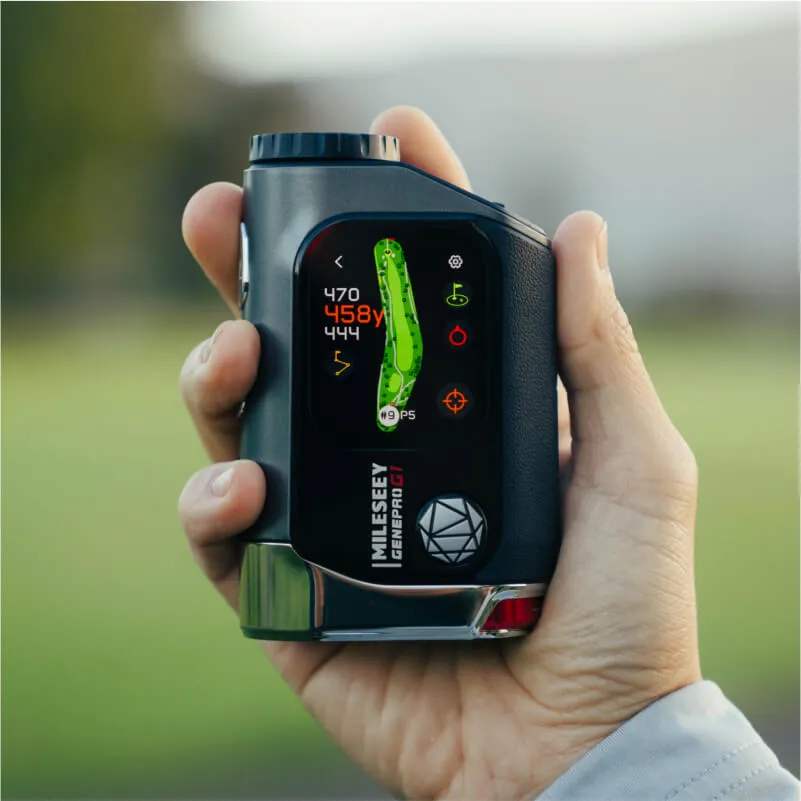
- Dynamic GPS Yardages to the Front, Center & Back of the Green
- SmartSlope™ Compensation with Rotating Tournament-Legal Switch
- 600-Yard Flag-Lock with ±0.5-Yard Accuracy in 0.1 Seconds
- Rain & Fog Mode with IP65 Weather Protection
Next Vision.
The new generation of GPS rangefinder.
A new generation hybrid rangefinder designed to completely transform how you approach every swing. It blends pinpoint laser accuracy with advanced GPS technology, all showcased on the largest touchscreen in the industry. This is the MILESEEY GenePro G1.
Highlights.
2.13" world's largest touchscreen on a rangefinder
600-yard instant flag-lock with ±0.5-yard measuring accuracy.
Detailed design with a unique rotating slope switch.
One Big Screen, All the Info You Need.
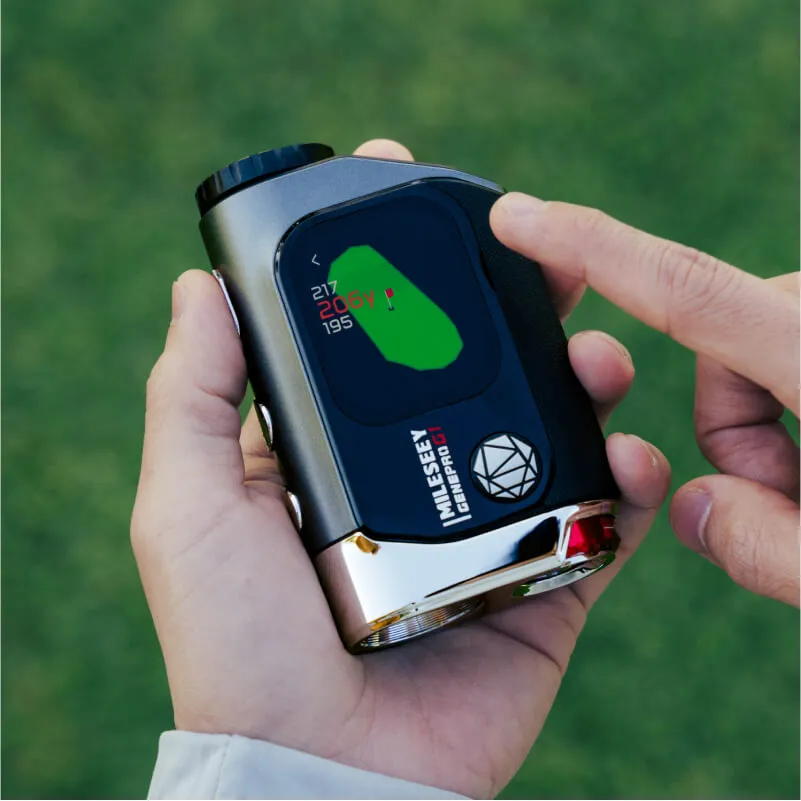
GenePro G1 beautifully integrates advanced GPS tech and unmatched laser precision into one modern design, giving golfers new insights into over 43,000 courses worldwide on the largest touchscreen ever.
2.13”
AMOLED touchscreen
43,000+
Preloaded Courses
Swing with Absolute Certainty.
GenePro G1 provides golfers with dynamic distances to the front, center and back of the green, giving them the data they need to select the most ideal club for every shot.
The Most Amazing Rangefinder yet, Magic at Your Fingertips.
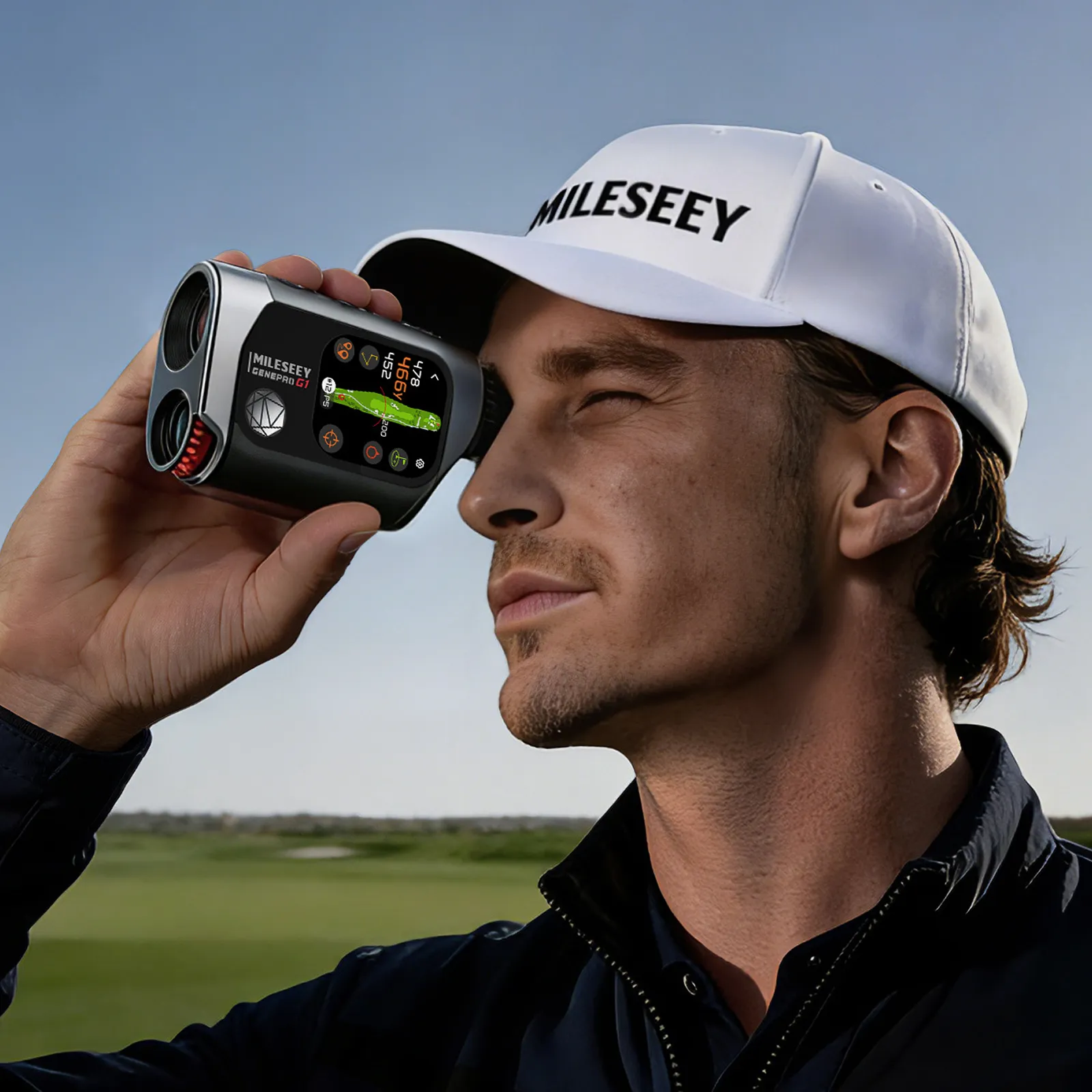
Golfers no longer need to rely on smart watches or golf apps, with just a few taps of the G1 they can easily plan their shots to avoid hitting hazards or find the center of a green even when their view's blocked.
Range Sync
displays the measured distance simultaneously on the touchscreen to show golfers what's in play.
Layup Feature
helps golfers to plan each shot and avoid hitting hazards.
Pin Pointer
shows golfers where the center of a green is even when they can't see it, eliminating the guesswork from blind shots.
Performance Tracking
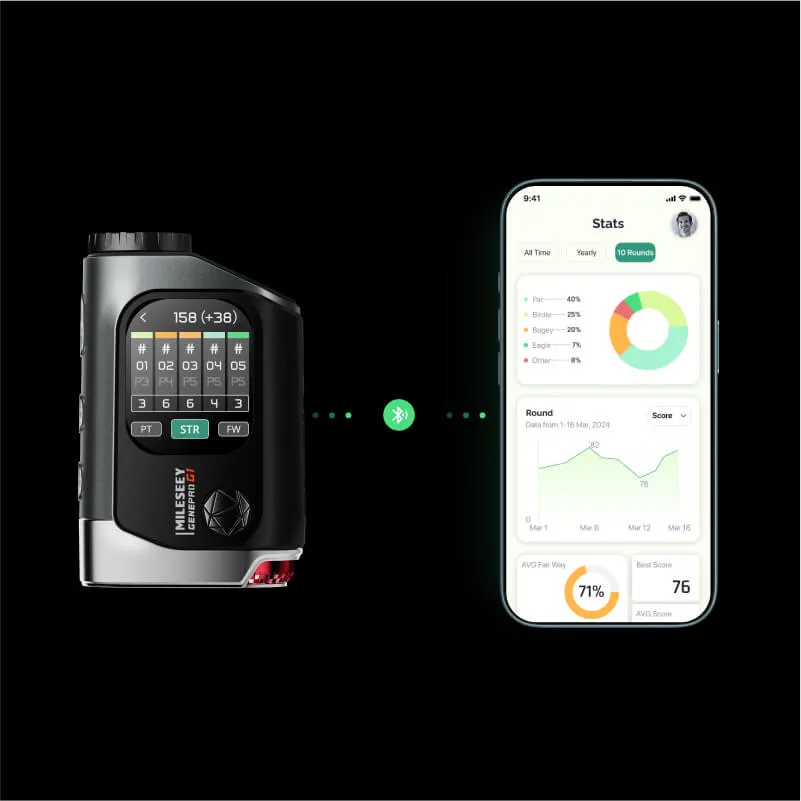
collects in-round shot data and syncs to the MILESEEY Golf App where it's thoughtfully displayed for post-round analysis.
Conquer Every Course with Clarity & Precision.
GenePro G1 isn't just a rangefinder--it's a revolution in your hands. From rolling hills to championship greens, GenePro G1 measures more than just distance--it hightens your potential, ensuring every round is a new opportunity for your personal best.
Measure with Tour-Level Accuracy.
600-Yard
Flag-Lock
±0.5-Yard
Measuring Accuracy
0.1s
Response Time
1,300-Yard
Max. Range
Our self-developed Background Interference Filtering technology ensures a clean and quick lock onto the pin, not the cluttered background.
Premium Optical Performance,View with Unmatched Clarity.
6X
Magnification
7.5°
Wide FOV
90%
Light Transmission
Mode | Ball-to-Pin | Measure – Everything Within Reach.
Next-Level Distance.
Measure Distances From Anywhere.
Patented Ball-to-Pin™ mode allows golfers to measure between any two points on the course from any location.
Range from Your Cart
Measure distances from the cart path to pick the right club in advance.
Help You Select Club
Measure your next shots distance while waiting for a friend to play theirs.
Range When Obstacles in the Way
Measure distances to a target when there's an obstacle in the way.
Next-Level Slope Compensation.
Proprietary SmartSlope™ tech factors in temperature, humidity and elevation to the slope algorithm, offering golfers the most accurate compensated distances ever.
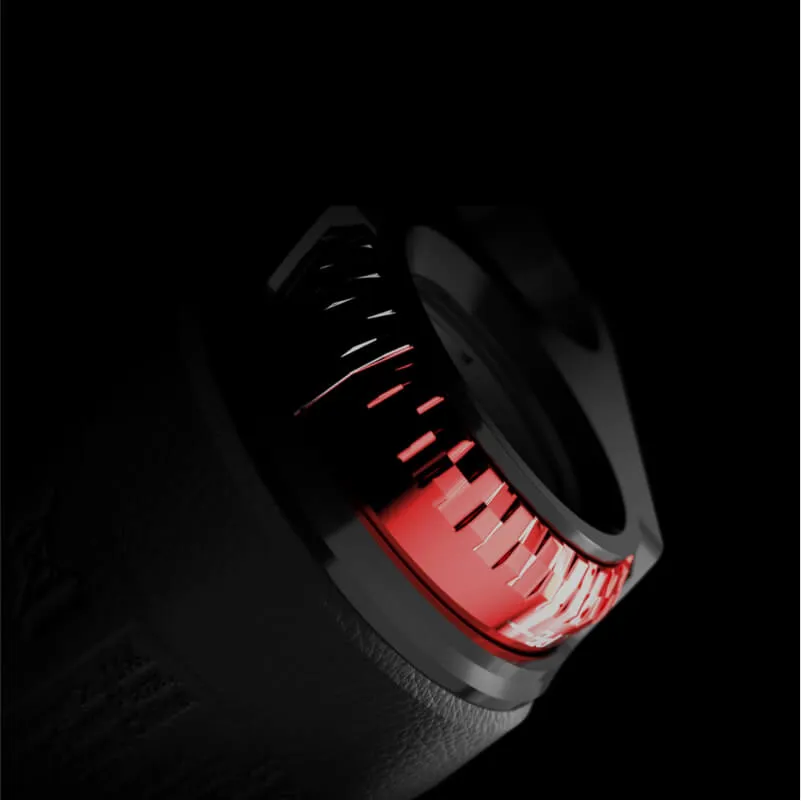
A unique rotating switch allows golfers to toggle the slope compensation on and off with ease, clearly signfying to others compliance with local and tournament rules for your every occasion.
Play More Golf with Exceptional Battery Life .
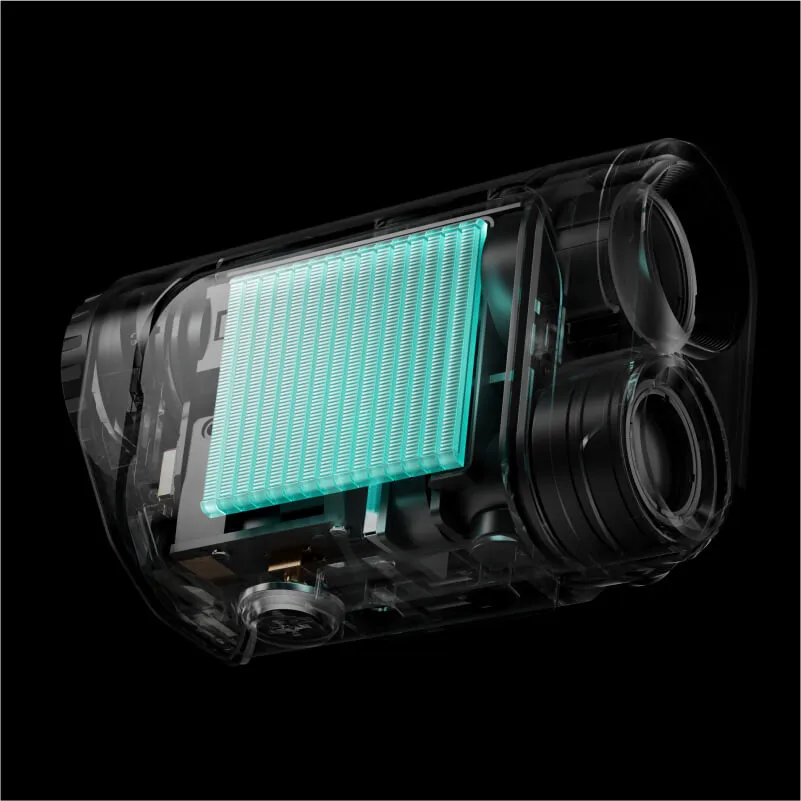
Packed with a 1,000mAh lithium battery pack, GenePro G1 boasts an amazing 24-hour battery life, delivering reliable performance round after round.
24-Hour
Ultra-Long Battery Life
4-5 Rounds
Easily Lasting
20,000
Ranges
MILESEEY GOLF APP
GenePro G1 keeps track of your each shot so golfers will konw their most frequent misses, how far they actually hit each of their clubs, which club to take for that difficult tee shot, and much more, helping them reducing their scores.
MILESEEY GOLF
App store
MILESEEY GOLF
Google play
Specifications
GenePro G1 Specs
Range
Up to 1,300 yds
Flag-Lock Range
600 yds
Accuracy
±0.5 yd
Measuring Speed
0.1 s
Magnification
6x
Field of View
7.5°
Objective Lens
22 mm
Eyepiece
18 mm
External Display
2.13″ AMOLED Touchscreen
Inner Display
Dual-color OLED (red/green)
Protection Rating
IP65
Battery
Built-in 1,000 mAh Li-ion, USB-C Rechargeable
Dimensions
105×69×38 mm
Weight
258 g
User Manual
User Manual
GenePro G1 User Manual
FAQ
FAQ
A. Using GenePro G1
What makes GenePro G1 different from a traditional rangefinder?
GenePro G1 combines advanced laser accuracy with a built-in GPS map on a 2.13” AMOLED touchscreen — offering a true hybrid experience for modern golfers, providing them both the precision they need for a successful shot and the overview information of the course they are playing.
Does GenePro G1 come with built-in golf course maps?
Yes. It includes preloaded maps of over 43,000 golf courses worldwide — no app or smartphone required. Just select the course you are going to play and enter, it will give you dynamic F/C/B distances to the green and hazard information of each hole, guiding you to the road of becoming a golf master.
What does Range Sync Arc do?
After a laser ranging, GenePro G1 draws an arc on the map showing what’s in play at your distance, so you'll know better to avoid landing the ball into hazards.
What is Ball-to-Pin™ mode and when should I use it?
Ball-to-Pin™ mode is a proprietary technology based on MILESEEY's leading Point-to-Point Measure, it allows you to measure between any two points on the course from any location, reducing the hassles of going back and forth.
For example, when your cart can't go further to the fairway, Ball-to-Pin™ mode lets you measure the distance from the ball to the pin from the cart path so you can pick the right club in advance, or when there are obstacles between you and the target, it can also help you measure over the obstacles and get the distance to the target.
Just shoot the ball to get the first measurement and then shoot the target to get the second, and G1 will automatically calculate the distance between the two and display it on the screen.
What does Pin Pointer do?
It shows the correct direction to the green center with GPS distance reading even when your line of sight to the green is hindered, eliminating blind shots. This feature is really helpful when you play on unfamiliar courses, helping you gain the edge back.
What do the numbers mean on the upper left corner of the touchscreen?
They are dynamic GPS distance readings to the Front, Center and Back of the green.
Can I use GenePro G1 in bright sunlight or poor weather?
Yes. The AMOLED touchscreen ensures high readability even in bright sunlight conditions. Enable the Rain & Fog mode to maintain laser accuracy and consistency when bad weather surprises your play.
What modes does GenePro G1 support?
Apart from standard single measurement mode, GenePro G1 also offers Flag-Lock mode (scanning) and Ball-to-Pin™ mode with an additional Rain & Fog settings.
Is GenePro G1 tournament-legal?
Yes — golfers can easily toggle the slope function on/off with the external rotating switch to stay tournament-legal.
How is SmartSlope™ different from standard slope compensation?
Apart from angles, SmartSlope™ factors in environmental elements, such as temperature, humidity and elevation to the slope algorithm to provide golfers the most accurate compensated distances on course, because sometimes in golf even an inch can be the difference between a hole-in-one and an epic fail. Rotate the external slope switch to OFF for tournament plays.
How do I get the most accurate readings?
To help ensure a consistent and accurate distance measurement, please note the following:
- Mist, rain, and fog affect ranging ability — enable Rain & Fog mode.
- Shiny, reflective surfaces reflect better than dull, textured ones.
- Ranging under cloud cover can improve performance compared to bright sun.
- Flat surfaces perpendicular to the laser beam reflect better than angled ones.
- At longer distances, larger objects are easier to range than smaller ones.
What should I do if my rangefinder has condensation in the lens?
If your rangefinder has condensation in the lens, put it in uncooked rice overnight to soak up the moisture. This should help remove condensation. If this does not help, please contact our customer support team for assistance.
B. Features & How It Works
How accurate and fast is the laser?
GenePro G1 offers a ±0.5-yard measuring accuracy with flag-lock range up to 600 yards. And it instantly sends pulse vibrations after you successfully lock onto the pin, usually within 0.1s, boosting your swing confidence for the perfect shot. Plus, with Background Interference Filtering tech, you'll never have to worry about having troubles locking onto the pin.
Do I need a phone, an app, or subscription to use GenePro G1?
No. Golfers can view course maps, plan shots with the Layup Feature or track performance directly from GenePro G1, no need to use a phone, a watch or download an app. They can also sync their round data to the paired MILESEEY Golf App with no subscription fees whatsoever.
Can I switch between yards and meters?
Yes. Long-press the Setting button to enter the device settings menu, short-press the Setting button to go to SET4 (Unit Switch), and then short-press the Measure button to switch between yard (Y) and meter (M).
Is the touchscreen glove-compatible?
Although GenePro G1 supports using with gloves on, for optimal responsiveness, use with bare fingers is highly recommended.
Why are my readings inconsistent or jumpy?
Your GenePro G1 might be set to the wrong unit of measurement. Toggle between yards/meters in Settings. Weather (fog/rain) may also affect accuracy — enable Rain & Fog mode. If still inaccurate, contact our customer support team.
Why doesn’t the Range Sync Arc show up after I take a laser reading?
Ensure you completed a laser read on the current hole map, then wait for the coverage arc to render. If you switched holes, re-enter the correct hole page first.
Why doesn’t the course data match the map on my GenePro G1?
Make sure you have selected the right tee box and hole. If a recent course change isn’t reflected, perform a course update via the app and re-sync.
Where can I download the User Manual or Quick Start Guide?
You can download the latest User Manual and Quick Start PDFs for G1 by clicking here.
How do I update course maps?
Follow the step-by-step guide on the G1 Support page. Map updates are free; ensure the device has sufficient power during updates.
What type of battery does GenePro G1 use?
GenePro G1 uses a high-capacity Li-ion battery with battery life up to 24 hours. Actual battery life may vary depending on usage.
Can I use any USB-C cable to charge my GenePro G1 Rangefinder?
Yes. It can be charged using any standard USB port or AC adapter. Heat during charging is normal.
Is GenePro G1 waterproof?
Yes, GenePro G1 is IP65 protected. That means it’s dust-tight and resistant to low-pressure water jets from any direction — suitable for wet environments but not submersion.
Does GenePro G1 comes with a built-in magnetic strip?
No. Strong magnetic fields could interfere with functions. Instead, a magnetic carrying case (sold separately) is available.
How to calibrate the Pin Pointer if it's off?
Go to Settings → Compass Calibration and follow on-screen instructions. Perform this outdoors on a real course and away from strong magnetic fields.
How should I clean my GenePro G1 Rangefinder?
- Blow away dust or debris first.
- Use the included cleaning cloth for dirt/fingerprints.
- For thorough cleaning, use photographic lens tissue with cleaning fluid (apply fluid to cloth, not directly).
- Device is water resistant but not waterproof — avoid heavy rain or submersion.
C. Purchase & Support
Where can I find the latest price of GenePro G1?
Prices may vary by region and promotions. Please check our Official Store for the latest offers.
Are course updates free?
Yes. Courses are preloaded and usable out of the box with lifetime FREE updates. See the Support Page for the update method.
What’s the warranty and return policy?
Every GenePro G1 is backed by a 10-Year Warranty for manufacturing defects plus a 30-Day Money-Back Guarantee to eliminate all your doubts and worries. Your purchase is always risk-free.
For more details, please see our Warranty and Return & Refunds policy.
How do I start a warranty claim or a return?
We’ve made returns and warranty claims simple. Submit your request through our Contact Us page or email [email protected]. Our support team will take care of you from there.
Product Information
Product Information
Shipping & Returns
Shipping & Returns
MILESEEY GenePro G1 Touchscreen & GPS Rangefinder
MILESEEY GenePro G1 Touchscreen & GPS Rangefinder
MILESEEY GenePro G1 Touchscreen & GPS Rangefinder
- Lifetime Access to 43,000+ Preloaded Courses without Subscription
- Biggest 2.13” AMOLED Touchscreen – Ultra Bright in Sunlight
- Dynamic GPS Yardages to the Front, Center & Back of the Green
- SmartSlope™ Compensation with Rotating Tournament-Legal Switch
- 600-Yard Flag-Lock with ±0.5-Yard Accuracy in 0.1 Seconds
- Rain & Fog Mode with IP65 Weather Protection
Next Vision.
The new generation of GPS rangefinder.
A new generation hybrid rangefinder designed to completely transform how you approach every swing. It blends pinpoint laser accuracy with advanced GPS technology, all showcased on the largest touchscreen in the industry. This is the MILESEEY GenePro G1.
Highlights.
2.13" world's largest touchscreen on a rangefinder
600-yard instant flag-lock with ±0.5-yard measuring accuracy.
Detailed design with a unique rotating slope switch.
One Big Screen, All the Info You Need.
GenePro G1 beautifully integrates advanced GPS tech and unmatched laser precision into one modern design, giving golfers new insights into over 43,000 courses worldwide on the largest touchscreen ever.
2.13”
AMOLED touchscreen
43,000+
Preloaded Courses
Swing with Absolute Certainty.
GenePro G1 provides golfers with dynamic distances to the front, center and back of the green, giving them the data they need to select the most ideal club for every shot.
The Most Amazing Rangefinder yet, Magic at Your Fingertips.
Golfers no longer need to rely on smart watches or golf apps, with just a few taps of the G1 they can easily plan their shots to avoid hitting hazards or find the center of a green even when their view's blocked.
Range Sync
displays the measured distance simultaneously on the touchscreen to show golfers what's in play.
Layup Feature
helps golfers to plan each shot and avoid hitting hazards.
Pin Pointer
shows golfers where the center of a green is even when they can't see it, eliminating the guesswork from blind shots.
Performance Tracking
collects in-round shot data and syncs to the MILESEEY Golf App where it's thoughtfully displayed for post-round analysis.
Conquer Every Course with Clarity & Precision.
GenePro G1 isn't just a rangefinder--it's a revolution in your hands. From rolling hills to championship greens, GenePro G1 measures more than just distance--it hightens your potential, ensuring every round is a new opportunity for your personal best.
Measure with Tour-Level Accuracy.
600-Yard
Flag-Lock
±0.5-Yard
Measuring Accuracy
0.1s
Response Time
1,300-Yard
Max. Range
Our self-developed Background Interference Filtering technology ensures a clean and quick lock onto the pin, not the cluttered background.
Premium Optical Performance,View with Unmatched Clarity.
6X
Magnification
7.5°
Wide FOV
90%
Light Transmission
Mode | Ball-to-Pin | Measure – Everything Within Reach.
Next-Level Distance.
Measure Distances From Anywhere.
Patented Ball-to-Pin™ mode allows golfers to measure between any two points on the course from any location.
Range from Your Cart
Measure distances from the cart path to pick the right club in advance.
Help You Select Club
Measure your next shots distance while waiting for a friend to play theirs.
Range When Obstacles in the Way
Measure distances to a target when there's an obstacle in the way.
Next-Level Slope Compensation.
Proprietary SmartSlope™ tech factors in temperature, humidity and elevation to the slope algorithm, offering golfers the most accurate compensated distances ever.
A unique rotating switch allows golfers to toggle the slope compensation on and off with ease, clearly signfying to others compliance with local and tournament rules for your every occasion.
Play More Golf with Exceptional Battery Life .
Packed with a 1,000mAh lithium battery pack, GenePro G1 boasts an amazing 24-hour battery life, delivering reliable performance round after round.
24-Hour
Ultra-Long Battery Life
4-5 Rounds
Easily Lasting
20,000
Ranges
MILESEEY GOLF APP
GenePro G1 keeps track of your each shot so golfers will konw their most frequent misses, how far they actually hit each of their clubs, which club to take for that difficult tee shot, and much more, helping them reducing their scores.
MILESEEY GOLF
App store
MILESEEY GOLF
Google play
Specifications
GenePro G1 Specs
Range
Up to 1,300 yds
Flag-Lock Range
600 yds
Accuracy
±0.5 yd
Measuring Speed
0.1 s
Magnification
6x
Field of View
7.5°
Objective Lens
22 mm
Eyepiece
18 mm
External Display
2.13″ AMOLED Touchscreen
Inner Display
Dual-color OLED (red/green)
Protection Rating
IP65
Battery
Built-in 1,000 mAh Li-ion, USB-C Rechargeable
Dimensions
105×69×38 mm
Weight
258 g
User Manual
User Manual
GenePro G1 User Manual
FAQ
FAQ
A. Using GenePro G1
What makes GenePro G1 different from a traditional rangefinder?
GenePro G1 combines advanced laser accuracy with a built-in GPS map on a 2.13” AMOLED touchscreen — offering a true hybrid experience for modern golfers, providing them both the precision they need for a successful shot and the overview information of the course they are playing.
Does GenePro G1 come with built-in golf course maps?
Yes. It includes preloaded maps of over 43,000 golf courses worldwide — no app or smartphone required. Just select the course you are going to play and enter, it will give you dynamic F/C/B distances to the green and hazard information of each hole, guiding you to the road of becoming a golf master.
What does Range Sync Arc do?
After a laser ranging, GenePro G1 draws an arc on the map showing what’s in play at your distance, so you'll know better to avoid landing the ball into hazards.
What is Ball-to-Pin™ mode and when should I use it?
Ball-to-Pin™ mode is a proprietary technology based on MILESEEY's leading Point-to-Point Measure, it allows you to measure between any two points on the course from any location, reducing the hassles of going back and forth.
For example, when your cart can't go further to the fairway, Ball-to-Pin™ mode lets you measure the distance from the ball to the pin from the cart path so you can pick the right club in advance, or when there are obstacles between you and the target, it can also help you measure over the obstacles and get the distance to the target.
Just shoot the ball to get the first measurement and then shoot the target to get the second, and G1 will automatically calculate the distance between the two and display it on the screen.
What does Pin Pointer do?
It shows the correct direction to the green center with GPS distance reading even when your line of sight to the green is hindered, eliminating blind shots. This feature is really helpful when you play on unfamiliar courses, helping you gain the edge back.
What do the numbers mean on the upper left corner of the touchscreen?
They are dynamic GPS distance readings to the Front, Center and Back of the green.
Can I use GenePro G1 in bright sunlight or poor weather?
Yes. The AMOLED touchscreen ensures high readability even in bright sunlight conditions. Enable the Rain & Fog mode to maintain laser accuracy and consistency when bad weather surprises your play.
What modes does GenePro G1 support?
Apart from standard single measurement mode, GenePro G1 also offers Flag-Lock mode (scanning) and Ball-to-Pin™ mode with an additional Rain & Fog settings.
Is GenePro G1 tournament-legal?
Yes — golfers can easily toggle the slope function on/off with the external rotating switch to stay tournament-legal.
How is SmartSlope™ different from standard slope compensation?
Apart from angles, SmartSlope™ factors in environmental elements, such as temperature, humidity and elevation to the slope algorithm to provide golfers the most accurate compensated distances on course, because sometimes in golf even an inch can be the difference between a hole-in-one and an epic fail. Rotate the external slope switch to OFF for tournament plays.
How do I get the most accurate readings?
To help ensure a consistent and accurate distance measurement, please note the following:
- Mist, rain, and fog affect ranging ability — enable Rain & Fog mode.
- Shiny, reflective surfaces reflect better than dull, textured ones.
- Ranging under cloud cover can improve performance compared to bright sun.
- Flat surfaces perpendicular to the laser beam reflect better than angled ones.
- At longer distances, larger objects are easier to range than smaller ones.
What should I do if my rangefinder has condensation in the lens?
If your rangefinder has condensation in the lens, put it in uncooked rice overnight to soak up the moisture. This should help remove condensation. If this does not help, please contact our customer support team for assistance.
B. Features & How It Works
How accurate and fast is the laser?
GenePro G1 offers a ±0.5-yard measuring accuracy with flag-lock range up to 600 yards. And it instantly sends pulse vibrations after you successfully lock onto the pin, usually within 0.1s, boosting your swing confidence for the perfect shot. Plus, with Background Interference Filtering tech, you'll never have to worry about having troubles locking onto the pin.
Do I need a phone, an app, or subscription to use GenePro G1?
No. Golfers can view course maps, plan shots with the Layup Feature or track performance directly from GenePro G1, no need to use a phone, a watch or download an app. They can also sync their round data to the paired MILESEEY Golf App with no subscription fees whatsoever.
Can I switch between yards and meters?
Yes. Long-press the Setting button to enter the device settings menu, short-press the Setting button to go to SET4 (Unit Switch), and then short-press the Measure button to switch between yard (Y) and meter (M).
Is the touchscreen glove-compatible?
Although GenePro G1 supports using with gloves on, for optimal responsiveness, use with bare fingers is highly recommended.
Why are my readings inconsistent or jumpy?
Your GenePro G1 might be set to the wrong unit of measurement. Toggle between yards/meters in Settings. Weather (fog/rain) may also affect accuracy — enable Rain & Fog mode. If still inaccurate, contact our customer support team.
Why doesn’t the Range Sync Arc show up after I take a laser reading?
Ensure you completed a laser read on the current hole map, then wait for the coverage arc to render. If you switched holes, re-enter the correct hole page first.
Why doesn’t the course data match the map on my GenePro G1?
Make sure you have selected the right tee box and hole. If a recent course change isn’t reflected, perform a course update via the app and re-sync.
Where can I download the User Manual or Quick Start Guide?
You can download the latest User Manual and Quick Start PDFs for G1 by clicking here.
How do I update course maps?
Follow the step-by-step guide on the G1 Support page. Map updates are free; ensure the device has sufficient power during updates.
What type of battery does GenePro G1 use?
GenePro G1 uses a high-capacity Li-ion battery with battery life up to 24 hours. Actual battery life may vary depending on usage.
Can I use any USB-C cable to charge my GenePro G1 Rangefinder?
Yes. It can be charged using any standard USB port or AC adapter. Heat during charging is normal.
Is GenePro G1 waterproof?
Yes, GenePro G1 is IP65 protected. That means it’s dust-tight and resistant to low-pressure water jets from any direction — suitable for wet environments but not submersion.
Does GenePro G1 comes with a built-in magnetic strip?
No. Strong magnetic fields could interfere with functions. Instead, a magnetic carrying case (sold separately) is available.
How to calibrate the Pin Pointer if it's off?
Go to Settings → Compass Calibration and follow on-screen instructions. Perform this outdoors on a real course and away from strong magnetic fields.
How should I clean my GenePro G1 Rangefinder?
- Blow away dust or debris first.
- Use the included cleaning cloth for dirt/fingerprints.
- For thorough cleaning, use photographic lens tissue with cleaning fluid (apply fluid to cloth, not directly).
- Device is water resistant but not waterproof — avoid heavy rain or submersion.
C. Purchase & Support
Where can I find the latest price of GenePro G1?
Prices may vary by region and promotions. Please check our Official Store for the latest offers.
Are course updates free?
Yes. Courses are preloaded and usable out of the box with lifetime FREE updates. See the Support Page for the update method.
What’s the warranty and return policy?
Every GenePro G1 is backed by a 10-Year Warranty for manufacturing defects plus a 30-Day Money-Back Guarantee to eliminate all your doubts and worries. Your purchase is always risk-free.
For more details, please see our Warranty and Return & Refunds policy.
How do I start a warranty claim or a return?
We’ve made returns and warranty claims simple. Submit your request through our Contact Us page or email [email protected]. Our support team will take care of you from there.
$499.99
MILESEEY GenePro G1 Touchscreen & GPS Rangefinder—
$499.99
Product Information
Product Information
Shipping & Returns
Shipping & Returns
Description
MILESEEY GenePro G1 Touchscreen & GPS Rangefinder
- Lifetime Access to 43,000+ Preloaded Courses without Subscription
- Biggest 2.13” AMOLED Touchscreen – Ultra Bright in Sunlight
- Dynamic GPS Yardages to the Front, Center & Back of the Green
- SmartSlope™ Compensation with Rotating Tournament-Legal Switch
- 600-Yard Flag-Lock with ±0.5-Yard Accuracy in 0.1 Seconds
- Rain & Fog Mode with IP65 Weather Protection
Next Vision.
The new generation of GPS rangefinder.
A new generation hybrid rangefinder designed to completely transform how you approach every swing. It blends pinpoint laser accuracy with advanced GPS technology, all showcased on the largest touchscreen in the industry. This is the MILESEEY GenePro G1.
Highlights.
2.13" world's largest touchscreen on a rangefinder
600-yard instant flag-lock with ±0.5-yard measuring accuracy.
Detailed design with a unique rotating slope switch.
One Big Screen, All the Info You Need.
GenePro G1 beautifully integrates advanced GPS tech and unmatched laser precision into one modern design, giving golfers new insights into over 43,000 courses worldwide on the largest touchscreen ever.
2.13”
AMOLED touchscreen
43,000+
Preloaded Courses
Swing with Absolute Certainty.
GenePro G1 provides golfers with dynamic distances to the front, center and back of the green, giving them the data they need to select the most ideal club for every shot.
The Most Amazing Rangefinder yet, Magic at Your Fingertips.
Golfers no longer need to rely on smart watches or golf apps, with just a few taps of the G1 they can easily plan their shots to avoid hitting hazards or find the center of a green even when their view's blocked.
Range Sync
displays the measured distance simultaneously on the touchscreen to show golfers what's in play.
Layup Feature
helps golfers to plan each shot and avoid hitting hazards.
Pin Pointer
shows golfers where the center of a green is even when they can't see it, eliminating the guesswork from blind shots.
Performance Tracking
collects in-round shot data and syncs to the MILESEEY Golf App where it's thoughtfully displayed for post-round analysis.
Conquer Every Course with Clarity & Precision.
GenePro G1 isn't just a rangefinder--it's a revolution in your hands. From rolling hills to championship greens, GenePro G1 measures more than just distance--it hightens your potential, ensuring every round is a new opportunity for your personal best.
Measure with Tour-Level Accuracy.
600-Yard
Flag-Lock
±0.5-Yard
Measuring Accuracy
0.1s
Response Time
1,300-Yard
Max. Range
Our self-developed Background Interference Filtering technology ensures a clean and quick lock onto the pin, not the cluttered background.
Premium Optical Performance,View with Unmatched Clarity.
6X
Magnification
7.5°
Wide FOV
90%
Light Transmission
Mode | Ball-to-Pin | Measure – Everything Within Reach.
Next-Level Distance.
Measure Distances From Anywhere.
Patented Ball-to-Pin™ mode allows golfers to measure between any two points on the course from any location.
Range from Your Cart
Measure distances from the cart path to pick the right club in advance.
Help You Select Club
Measure your next shots distance while waiting for a friend to play theirs.
Range When Obstacles in the Way
Measure distances to a target when there's an obstacle in the way.
Next-Level Slope Compensation.
Proprietary SmartSlope™ tech factors in temperature, humidity and elevation to the slope algorithm, offering golfers the most accurate compensated distances ever.
A unique rotating switch allows golfers to toggle the slope compensation on and off with ease, clearly signfying to others compliance with local and tournament rules for your every occasion.
Play More Golf with Exceptional Battery Life .
Packed with a 1,000mAh lithium battery pack, GenePro G1 boasts an amazing 24-hour battery life, delivering reliable performance round after round.
24-Hour
Ultra-Long Battery Life
4-5 Rounds
Easily Lasting
20,000
Ranges
MILESEEY GOLF APP
GenePro G1 keeps track of your each shot so golfers will konw their most frequent misses, how far they actually hit each of their clubs, which club to take for that difficult tee shot, and much more, helping them reducing their scores.
MILESEEY GOLF
App store
MILESEEY GOLF
Google play
Specifications
GenePro G1 Specs
Range
Up to 1,300 yds
Flag-Lock Range
600 yds
Accuracy
±0.5 yd
Measuring Speed
0.1 s
Magnification
6x
Field of View
7.5°
Objective Lens
22 mm
Eyepiece
18 mm
External Display
2.13″ AMOLED Touchscreen
Inner Display
Dual-color OLED (red/green)
Protection Rating
IP65
Battery
Built-in 1,000 mAh Li-ion, USB-C Rechargeable
Dimensions
105×69×38 mm
Weight
258 g
User Manual
User Manual
GenePro G1 User Manual
FAQ
FAQ
A. Using GenePro G1
What makes GenePro G1 different from a traditional rangefinder?
GenePro G1 combines advanced laser accuracy with a built-in GPS map on a 2.13” AMOLED touchscreen — offering a true hybrid experience for modern golfers, providing them both the precision they need for a successful shot and the overview information of the course they are playing.
Does GenePro G1 come with built-in golf course maps?
Yes. It includes preloaded maps of over 43,000 golf courses worldwide — no app or smartphone required. Just select the course you are going to play and enter, it will give you dynamic F/C/B distances to the green and hazard information of each hole, guiding you to the road of becoming a golf master.
What does Range Sync Arc do?
After a laser ranging, GenePro G1 draws an arc on the map showing what’s in play at your distance, so you'll know better to avoid landing the ball into hazards.
What is Ball-to-Pin™ mode and when should I use it?
Ball-to-Pin™ mode is a proprietary technology based on MILESEEY's leading Point-to-Point Measure, it allows you to measure between any two points on the course from any location, reducing the hassles of going back and forth.
For example, when your cart can't go further to the fairway, Ball-to-Pin™ mode lets you measure the distance from the ball to the pin from the cart path so you can pick the right club in advance, or when there are obstacles between you and the target, it can also help you measure over the obstacles and get the distance to the target.
Just shoot the ball to get the first measurement and then shoot the target to get the second, and G1 will automatically calculate the distance between the two and display it on the screen.
What does Pin Pointer do?
It shows the correct direction to the green center with GPS distance reading even when your line of sight to the green is hindered, eliminating blind shots. This feature is really helpful when you play on unfamiliar courses, helping you gain the edge back.
What do the numbers mean on the upper left corner of the touchscreen?
They are dynamic GPS distance readings to the Front, Center and Back of the green.
Can I use GenePro G1 in bright sunlight or poor weather?
Yes. The AMOLED touchscreen ensures high readability even in bright sunlight conditions. Enable the Rain & Fog mode to maintain laser accuracy and consistency when bad weather surprises your play.
What modes does GenePro G1 support?
Apart from standard single measurement mode, GenePro G1 also offers Flag-Lock mode (scanning) and Ball-to-Pin™ mode with an additional Rain & Fog settings.
Is GenePro G1 tournament-legal?
Yes — golfers can easily toggle the slope function on/off with the external rotating switch to stay tournament-legal.
How is SmartSlope™ different from standard slope compensation?
Apart from angles, SmartSlope™ factors in environmental elements, such as temperature, humidity and elevation to the slope algorithm to provide golfers the most accurate compensated distances on course, because sometimes in golf even an inch can be the difference between a hole-in-one and an epic fail. Rotate the external slope switch to OFF for tournament plays.
How do I get the most accurate readings?
To help ensure a consistent and accurate distance measurement, please note the following:
- Mist, rain, and fog affect ranging ability — enable Rain & Fog mode.
- Shiny, reflective surfaces reflect better than dull, textured ones.
- Ranging under cloud cover can improve performance compared to bright sun.
- Flat surfaces perpendicular to the laser beam reflect better than angled ones.
- At longer distances, larger objects are easier to range than smaller ones.
What should I do if my rangefinder has condensation in the lens?
If your rangefinder has condensation in the lens, put it in uncooked rice overnight to soak up the moisture. This should help remove condensation. If this does not help, please contact our customer support team for assistance.
B. Features & How It Works
How accurate and fast is the laser?
GenePro G1 offers a ±0.5-yard measuring accuracy with flag-lock range up to 600 yards. And it instantly sends pulse vibrations after you successfully lock onto the pin, usually within 0.1s, boosting your swing confidence for the perfect shot. Plus, with Background Interference Filtering tech, you'll never have to worry about having troubles locking onto the pin.
Do I need a phone, an app, or subscription to use GenePro G1?
No. Golfers can view course maps, plan shots with the Layup Feature or track performance directly from GenePro G1, no need to use a phone, a watch or download an app. They can also sync their round data to the paired MILESEEY Golf App with no subscription fees whatsoever.
Can I switch between yards and meters?
Yes. Long-press the Setting button to enter the device settings menu, short-press the Setting button to go to SET4 (Unit Switch), and then short-press the Measure button to switch between yard (Y) and meter (M).
Is the touchscreen glove-compatible?
Although GenePro G1 supports using with gloves on, for optimal responsiveness, use with bare fingers is highly recommended.
Why are my readings inconsistent or jumpy?
Your GenePro G1 might be set to the wrong unit of measurement. Toggle between yards/meters in Settings. Weather (fog/rain) may also affect accuracy — enable Rain & Fog mode. If still inaccurate, contact our customer support team.
Why doesn’t the Range Sync Arc show up after I take a laser reading?
Ensure you completed a laser read on the current hole map, then wait for the coverage arc to render. If you switched holes, re-enter the correct hole page first.
Why doesn’t the course data match the map on my GenePro G1?
Make sure you have selected the right tee box and hole. If a recent course change isn’t reflected, perform a course update via the app and re-sync.
Where can I download the User Manual or Quick Start Guide?
You can download the latest User Manual and Quick Start PDFs for G1 by clicking here.
How do I update course maps?
Follow the step-by-step guide on the G1 Support page. Map updates are free; ensure the device has sufficient power during updates.
What type of battery does GenePro G1 use?
GenePro G1 uses a high-capacity Li-ion battery with battery life up to 24 hours. Actual battery life may vary depending on usage.
Can I use any USB-C cable to charge my GenePro G1 Rangefinder?
Yes. It can be charged using any standard USB port or AC adapter. Heat during charging is normal.
Is GenePro G1 waterproof?
Yes, GenePro G1 is IP65 protected. That means it’s dust-tight and resistant to low-pressure water jets from any direction — suitable for wet environments but not submersion.
Does GenePro G1 comes with a built-in magnetic strip?
No. Strong magnetic fields could interfere with functions. Instead, a magnetic carrying case (sold separately) is available.
How to calibrate the Pin Pointer if it's off?
Go to Settings → Compass Calibration and follow on-screen instructions. Perform this outdoors on a real course and away from strong magnetic fields.
How should I clean my GenePro G1 Rangefinder?
- Blow away dust or debris first.
- Use the included cleaning cloth for dirt/fingerprints.
- For thorough cleaning, use photographic lens tissue with cleaning fluid (apply fluid to cloth, not directly).
- Device is water resistant but not waterproof — avoid heavy rain or submersion.
C. Purchase & Support
Where can I find the latest price of GenePro G1?
Prices may vary by region and promotions. Please check our Official Store for the latest offers.
Are course updates free?
Yes. Courses are preloaded and usable out of the box with lifetime FREE updates. See the Support Page for the update method.
What’s the warranty and return policy?
Every GenePro G1 is backed by a 10-Year Warranty for manufacturing defects plus a 30-Day Money-Back Guarantee to eliminate all your doubts and worries. Your purchase is always risk-free.
For more details, please see our Warranty and Return & Refunds policy.
How do I start a warranty claim or a return?
We’ve made returns and warranty claims simple. Submit your request through our Contact Us page or email [email protected]. Our support team will take care of you from there.